Apple iPad – The Colorful, Powerful All-Screen iPad
Outline of the Article
1. Introduction: The New Era of iPad
2. Design and Display
3. Performance Powered by the A16 Chip
4. Storage and Battery Life
5. Productivity with iPadOS
6. Apple Pencil and Creativity Tools
7. Magic Keyboard Folio and Accessories
8. Cameras and Multimedia Features
9. Sound and Entertainment
10. Connectivity and 5G Options
11. Everyday Use Cases
12. Environmental Commitment
13. Privacy and Security
14. Accessibility Features
15. Comparison with Other iPad Models
17. Conclusion: Why the New iPad is a Game-Changer
18. FAQs
1. Introduction: The New Era of iPad
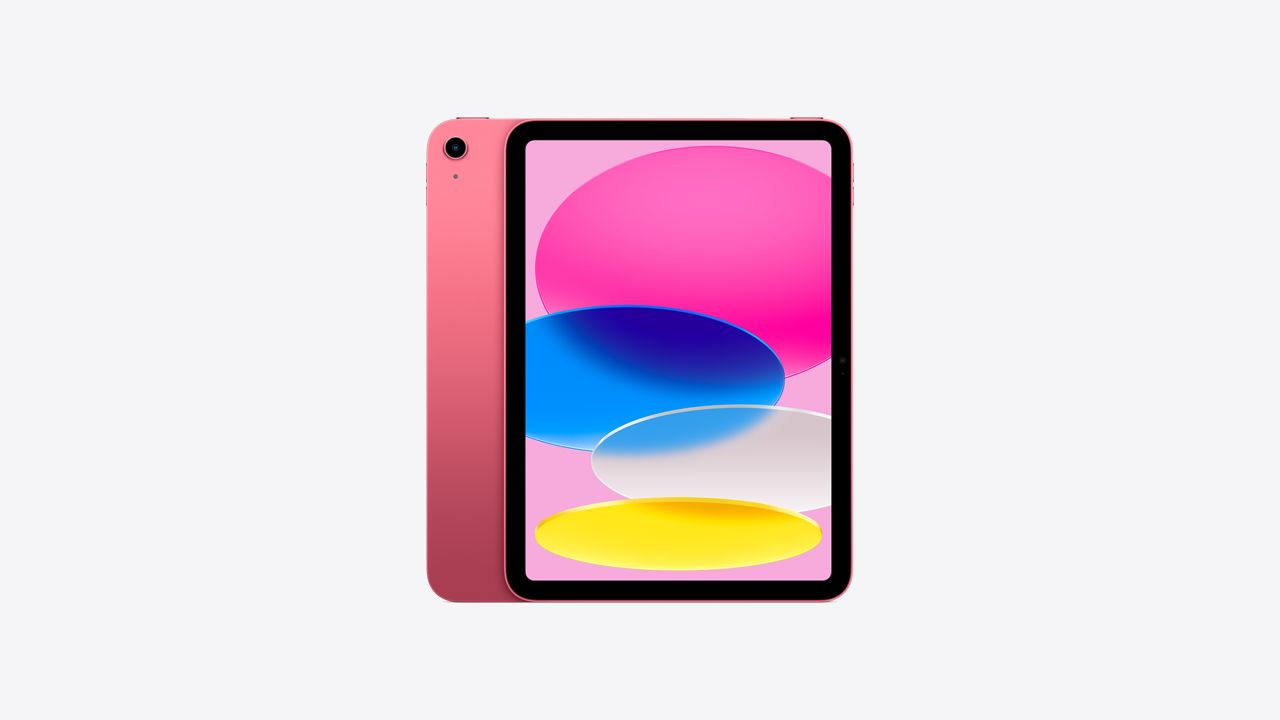
Apple has once again reimagined what the iPad can be with its latest all-screen design iPad. Positioned as the perfect balance between performance, creativity, and affordability, this new iPad is built for everyday use yet powerful enough for advanced tasks. Starting at just $349 or $29.08 per month, it introduces features once reserved for higher-end models, like the superfast A16 chip and stunning 11-inch Liquid Retina display.
The new iPad is colorful, versatile, and incredibly fun to use. Apple calls it Lovable. Drawable. Magical. — and with good reason. Whether you’re sketching ideas with Apple Pencil, typing on the Magic Keyboard Folio, or editing 4K video, the iPad delivers a seamless experience that adapts to your lifestyle.
This isn’t just a tablet; it’s a portable creative powerhouse. From students to professionals to casual users, the iPad brings together everything you need in one sleek device.
2. Design and Display
The design philosophy of the new iPad revolves around simplicity, vibrancy, and immersion. With its all-screen design, bezels are slim, making way for a gorgeous 11-inch Liquid Retina display. This display is sharp, bright, and vivid, bringing every app, movie, or game to life with crystal clarity.
Apple offers the iPad in bold, fun colors like blue, pink, yellow, and silver. These shades reflect its youthful energy, making the device not just functional but also a personal statement. Whether you want something professional or playful, there’s a color that matches your style.
One of the key highlights is True Tone technology. This feature automatically adjusts the color temperature of the display based on your environment, ensuring comfortable viewing whether you’re outdoors in bright light or indoors at night.
The result? A screen that feels easy on the eyes while still delivering incredible detail and accuracy—perfect for everything from late-night reading to binge-watching your favorite shows.
3. Performance Powered by the A16 Chip
At the heart of this new iPad lies the A16 Bionic chip, the same powerhouse found in recent iPhones. This processor makes the iPad faster and more efficient than ever before, giving you desktop-level performance in a portable form.
The Neural Engine built into the A16 chip powers machine learning tasks, making it easier to edit photos, recognize text in images, or even handle augmented reality apps effortlessly. Whether you’re managing multiple apps, streaming high-definition videos, or running demanding games, the iPad stays responsive and smooth.
Another benefit of the A16 chip is its ability to handle multitasking without slowing down. With iPadOS, you can run multiple apps side by side, take notes while attending a video call, or drag and drop content between apps with zero lag.
This performance boost makes the new iPad not just a casual device but also a serious productivity tool capable of handling professional workloads.
4. Storage and Battery Life
Apple has finally listened to its users by offering 128GB of starting storage. This is a big step up from the previous 64GB base, giving you more room for apps, photos, videos, and creative projects right out of the box.
For heavy users, additional storage options are available, ensuring you’ll never run out of space for your files, schoolwork, or content library.
When it comes to power, the iPad doesn’t disappoint. With all-day battery life, you can use it for browsing, streaming, drawing, or working without constantly searching for a charger. Whether you’re on a long flight, attending classes all day, or simply enjoying a weekend binge, the iPad keeps up with your pace.
Thanks to the efficiency of the A16 chip, battery life is optimized for demanding apps and multitasking, giving you the confidence to carry your iPad everywhere without worry.
5. Productivity with iPadOS
The iPadOS experience is where Apple truly shines, turning the iPad into more than just a media device. With features like Split View and Slide Over, multitasking feels natural and intuitive. You can check emails while taking notes, or browse Safari while editing a document—all without losing focus.
One of the most exciting updates is Smart Script, a tool that makes handwritten notes more fluid and legible. Combined with Math Notes, you can solve equations directly using Apple Pencil, making it a perfect companion for students.
Collaboration is also smoother than ever. With tools like Freeform, FaceTime integration, and real-time editing in productivity apps, iPadOS empowers you to work, learn, and create with others seamlessly.
In short, iPadOS transforms the iPad into a true productivity machine, blending creativity and efficiency in one easy-to-use platform.
6. Apple Pencil and Creativity Tools
The new iPad is more than a productivity device — it’s a canvas for creativity. With support for Apple Pencil (USB-C and 1st generation), you can draw, sketch, annotate, and brainstorm with remarkable precision. Apple Pencil delivers pixel-perfect accuracy and ultra-low latency, so whether you’re writing notes or creating detailed illustrations, it feels as natural as putting pen to paper.
For artists, designers, and students, the iPad unlocks a world of creative possibilities. Apps like Procreate, Notability, and GoodNotes elevate the experience, letting you draw vibrant art pieces, create detailed diagrams, or take handwritten notes that convert into digital text.
One of the highlights is the ability to draw directly on videos and photos. This feature makes the iPad an excellent tool for content creators who want to storyboard, annotate, or add flair to their projects.
Apple Pencil also shines in educational use. Students can solve equations in Math Notes, mark up PDFs, or simply jot down thoughts during lectures. For professionals, the ability to sign documents, sketch ideas, and annotate presentations saves time and boosts efficiency.
In short, Apple Pencil turns the iPad into a versatile creative powerhouse, offering tools that adapt to your imagination.
7. Magic Keyboard Folio and Accessories
No iPad experience is complete without the Magic Keyboard Folio, which transforms your tablet into a portable workstation. Unlike traditional keyboard cases, the Magic Keyboard Folio has a two-piece design: a detachable keyboard and a protective back panel with an adjustable stand. This gives you flexibility, whether you’re typing an email, streaming a movie, or sketching with Apple Pencil.
The keyboard itself delivers a comfortable typing experience, complete with a 14-key function row for quick shortcuts. Add to that a click-anywhere trackpad, and suddenly your iPad feels a lot like a laptop. Best of all, the Magic Keyboard Folio requires no pairing or charging — it attaches magnetically and is always ready to use.
Other accessories like the Smart Folio provide stylish protection, while the USB-C port ensures easy connectivity to external drives, displays, and docks. Pair these with AirPods for seamless audio, and you’ve got a complete Apple ecosystem in one compact package.
Apple’s accessory lineup doesn’t just add convenience — it expands what your iPad can do, making it equally suited for work, study, and play.
8. Cameras and Multimedia Features
Apple has equipped the new iPad with powerful camera technology that elevates its multimedia capabilities. On the back, you get a 12MP Wide camera capable of shooting stunning photos and 4K videos. Whether you’re capturing memories, scanning documents, or editing footage, the iPad is more than capable of handling it.
The real star, however, is the 12MP Ultra Wide front camera with Center Stage. This feature ensures you stay perfectly in frame during FaceTime calls, video conferences, or while recording vlogs. As you move around, the camera automatically adjusts, creating a smooth and professional experience.
Apple’s Smart HDR 4 technology further enhances photo quality, making your selfies and video calls look more natural and vibrant. Combined with editing tools in the Photos app, you can retouch images, crop videos, or even use Visual Look Up to identify objects and landmarks.
From work meetings to family calls to creative video projects, the iPad’s cameras make it an all-in-one multimedia hub.
9. Sound and Entertainment
When it comes to entertainment, the iPad doesn’t just stop at visuals — it delivers immersive sound too. With landscape stereo speakers, movies, games, and music sound rich and balanced. Pair them with the vivid 11-inch Liquid Retina display, and you’ve got a portable cinema in your hands.
For learning and exploration, the iPad supports augmented reality (AR) experiences. Imagine exploring the solar system in 3D, bringing historical artifacts into your living room, or learning anatomy interactively. The combination of AR and iPad’s display makes education more engaging than ever.
Gamers will love the new Game Mode, which optimizes performance and ensures smoother frame rates in graphics-intensive titles. With support for gaming controllers and SharePlay, you can either invite friends to watch or join multiplayer action with ease.
Whether you’re binge-watching Apple TV+, creating music in GarageBand, or diving into AR, the iPad proves to be a powerful entertainment device that fits every mood.
10. Connectivity and 5G Options
The new iPad ensures you stay connected wherever you go. It comes with blazing-fast Wi-Fi, making browsing, streaming, and downloading quick and seamless. For users who need internet on the move, there’s also a Wi-Fi + Cellular model with 5G support. This means you can enjoy high-speed internet whether you’re traveling, commuting, or working remotely.
With 5G, streaming HD content, gaming online, and video conferencing all happen without lag. And the best part? You can choose flexible data plans that fit your needs, making it cost-effective for students, professionals, or travelers.
Connectivity doesn’t stop there. The USB-C port allows you to expand the iPad’s capabilities further. You can connect external drives to back up files, link it to monitors for presentations, or attach docks and hubs for a complete workstation setup.
In essence, the new iPad is built to keep you always connected, always ready — whether through Wi-Fi, 5G, or versatile USB-C connections.
11. Everyday Use Cases
The new iPad is designed for everyone, blending power with versatility. Its features adapt seamlessly to different lifestyles, making it a tool that’s as useful in the classroom as it is in the office or on the couch.
- For students: With Apple Pencil support, iPadOS tools like Math Notes, and access to millions of educational apps, the iPad becomes an interactive notebook, research tool, and study partner. Split-screen multitasking lets students watch lectures while jotting down notes, while the portability makes it easy to carry between classes.
- For professionals: The combination of the A16 chip, Magic Keyboard Folio, and iPadOS transforms the iPad into a serious work machine. You can draft reports, collaborate on presentations, edit spreadsheets, and jump into video calls all on one device. With 5G support, it’s the ultimate work companion for professionals on the move.
- For creatives: Artists, musicians, and video editors can unleash their imagination. From drawing in Procreate to composing in GarageBand, the iPad offers creative apps that turn ideas into reality. The powerful A16 chip even allows 4K video editing, something unthinkable on older iPads at this price point.
- For entertainment lovers: Binge-watch your favorite shows, play games with Game Mode, or explore AR experiences. The stunning Liquid Retina display and stereo speakers make entertainment immersive whether you’re at home or traveling.
This versatility makes the iPad a true all-in-one device. Whether you’re learning, working, creating, or relaxing, it adapts to what you need, when you need it.
12. Environmental Commitment
Apple continues to push forward with its environmental goals, and the new iPad plays a major role in that mission. Apple is already carbon neutral in its corporate operations, and by 2030, the goal is for every Apple product to be carbon neutral too.
This iPad is built using recycled and renewable materials, reducing its overall footprint. Packaging has been redesigned to minimize waste, and components like aluminum, tin, and rare earth elements are sourced responsibly.
In addition, Apple’s Trade In program allows you to return your old iPad in exchange for credit toward a new one. Devices that can’t be resold are recycled responsibly, ensuring nothing goes to waste.
By choosing the iPad, users aren’t just getting a powerful device — they’re also contributing to a more sustainable future. It’s Apple’s way of blending innovation with responsibility.
13. Privacy and Security
As with all Apple products, the new iPad puts privacy at the forefront. With Touch ID integrated into the power button, unlocking your device, signing in to apps, and making secure purchases is fast and safe.
Apple’s commitment to privacy goes beyond hardware. iPadOS includes built-in protections that minimize tracking, give you control over app permissions, and safeguard your personal data. Features like on-device processing for Siri and machine learning ensure your data doesn’t leave your device unnecessarily.
Payment systems like Apple Pay further emphasize security. With encrypted transactions and Face ID or Touch ID verification, your financial information stays protected.
In a digital world where data privacy is often compromised, Apple continues to stand out by making sure that your information stays yours.
14. Accessibility Features
Apple believes technology is most powerful when everyone can use it. That’s why the new iPad is packed with accessibility features designed to support vision, hearing, mobility, and cognitive needs.
- For vision support: Features like VoiceOver, Magnifier, and Display Accommodations help users navigate the iPad with ease.
- For hearing support: Live Captions and compatibility with hearing aids ensure communication remains clear.
- For mobility: AssistiveTouch allows users to control the iPad without needing to touch the screen directly, while Switch Control helps people with limited mobility use external adaptive devices.
- For cognitive support: Features like Guided Access keep users focused by limiting distractions, while Speak Screen can read content aloud.
These accessibility tools make the iPad a device for everyone, ensuring that technology breaks barriers instead of creating them.
15. Comparison with Other iPad Models
Choosing the right iPad can feel overwhelming, given Apple’s diverse lineup. Here’s how the new iPad compares to its siblings:
- iPad Pro (from $999): The most advanced model with M4 chip, Ultra Retina XDR display, ProMotion technology, and support for Apple Pencil Pro. Perfect for professionals who need cutting-edge performance.
- iPad Air (from $599): Slim and powerful with the M3 chip and support for Apple Pencil Pro. It strikes a balance between portability and performance, ideal for creatives and students.
- iPad (from $349): The most affordable all-screen iPad with the A16 chip, 11-inch Liquid Retina display, and support for Apple Pencil (USB-C/1st gen). A great choice for everyday users, students, and families.
- iPad Mini (from $499): Compact and portable with an 8.3-inch display and the powerful A17 Pro chip. Best suited for users who want performance in a small form factor.
If you want the perfect blend of affordability, performance, and versatility, the new iPad is the sweet spot.
Read our previous Article about Best Fire TV Stick for 2025
16. Conclusion: Why the New iPad is a Game-Changer
The new iPad proves that power, creativity, and fun can come at an affordable price. With its stunning all-screen design, A16 chip, 128GB of base storage, and compatibility with Apple Pencil and Magic Keyboard Folio, it’s a device built for work, play, and everything in between.
It’s colorful, versatile, and future-ready, with 5G connectivity, USB-C expansion, and a host of accessories that expand its potential. Add in Apple’s commitment to sustainability, privacy, and accessibility, and you have a product that reflects both innovation and responsibility.
Whether you’re a student, professional, creative, or casual user, the iPad adapts to your needs — making it one of the best all-round tablets available today.
17. FAQs
Is the new iPad worth upgrading to?
Yes, especially if you own an older iPad with less storage or an outdated chip. The A16 chip, 128GB base storage, and Liquid Retina display make this upgrade significant.
Does it support Apple Pencil Pro?
No, the new iPad supports Apple Pencil (USB-C) and Apple Pencil (1st generation), but not Apple Pencil Pro.
How is it different from the iPad Air?
The iPad Air has a more advanced M3 chip and supports Apple Pencil Pro, making it better suited for heavy creative or professional work. The standard iPad is more affordable and geared toward everyday tasks.
Can it replace a laptop for work?
For many users, yes. With the Magic Keyboard Folio, multitasking features, and iPadOS, the iPad can handle work tasks like typing, presentations, video calls, and even light video editing.
Which accessories should I buy first?
The Apple Pencil and Magic Keyboard Folio are the most recommended, as they unlock the iPad’s full creative and productivity potential.